Run Your First Lodge Table
A beginner’s guide to GMing Pathfinder Society Second Edition
You do not need to know every rule to run a good game. Your job is to prepare the adventure, help everyone participate, make fair decisions, and record the results. Whether you have run other games or are sitting behind the screen for the first time, the Lodge can help.
This guide follows a Pittsburgh Lodge table from claiming a GM seat through handing out Chronicles and submitting the reporting roster.
1. Sign up and get the scenario
Find an available GM seat on the Pittsburgh Organized Play Warhorn schedule and sign up. Then contact the Venture Agent (VA) for that venue. Tell them this is your first Society table so they can help you get started.
Confirm the scenario number and title, level range, date, start and end times, and any setup requirements. If you are unsure who coordinates a venue, ask in the Lodge Discord. Give yourself time to prepare, and let your VA know promptly if your plans change.
Get your copy
You can purchase the scenario PDF directly from Paizo and prepare from your own digital or printed copy. Confirm the scenario number and title before buying it.
If you need help obtaining a copy or arranging printing, contact your venue’s Venture Agent well before game day. The Lodge can help with access and preparation, so don’t let a lack of materials stop you from volunteering.
The Lodge also has maps available to borrow. Ask early if you need one. Simple tokens, pawns, and a clearly drawn map work well; elaborate props are optional.
2. Prepare the adventure
Pathfinder Society is a shared campaign: players take their characters from one GM’s table to another. You will use three kinds of guidance: Pathfinder’s game rules, Society’s campaign rules, and the Lodge’s arrangements for this event.
Read the relevant parts of the current Pathfinder Society guide on Lorespire. You do not need to memorize it or become an expert in Golarion’s history before running your first game.
First pass: understand the story
Read the scenario from beginning to end, including its conclusion and rewards. Identify what the characters are trying to accomplish, who the important NPCs are, which clues lead to the next scene, and what determines success. Knowing the destination makes it easier to answer questions along the way.
Second pass: prepare to run it
Review creature abilities, hazards, spells, and reactions you have not used before. For a special subsystem, practice explaining what players can do and how their choices affect progress. Keep brief notes and page references instead of rewriting the entire adventure.
Mark encounter adjustments, treasure, objectives, and reporting conditions where you will see them during play. Check for scenario updates. Older adventures and newer ones may use different methods for adjusting difficulty; follow the instructions for your adventure and the current preparation guidance. Ask your VA about an unusually small table or an unclear adjustment.
3. Pack for game day
- The scenario and the rules or stat blocks you will need.
- Maps, tokens or pawns, and any player handouts.
- Dice, pencils, scratch paper, and a way to track initiative.
- A sign-in/reporting roster and enough Chronicle sheets for the table.
- Your Organized Play ID, plus the event name and event code supplied by the VA.
- Any agreed-upon pregenerated characters or borrowed materials.
The Paizo event code identifies the event used for reporting. It is not the scenario number or the Warhorn listing ID. If using a device, download your materials and check its charge before leaving home.
4. Welcome players and collect information
Arrive early enough to set up without rushing. Introduce yourself, learn everyone’s names, and let the table know you are a first-time Society GM. Explain the expected finish time and breaks, mention relevant content warnings, and give players a way to raise boundaries or concerns.
Pass the roster around before play
Collect character names, full Organized Play IDs with character numbers, levels, factions, and advancement choices. A player’s account number alone does not identify which character receives credit. Check the sheet for missing information while everyone is still at the table.
Warhorn registration is not a replacement for the roster. If a player is new, missing an ID, or using a pregen, ask your VA for help with the appropriate credit arrangements. If you will send Chronicles later, agree on delivery and collect any needed contact details separately.
The sample form below has character-name fields, but no separate player-name or contact fields. Keep a brief supplemental note when needed, and share contact information only with those handling the game.
5. Run the session
Start with a clear briefing: what is the mission, why are the characters involved, and what do they know? Invite questions before sending them into the adventure. Follow the current scenario and campaign instructions for any supplied consumables; older adventures may refer to superseded provisions.
Each character normally begins with one Hero Point. Account for applicable benefits, and remember to award more during play—roughly one per hour across the table. Ask about exploration activities when the party begins investigating or traveling.
Describe, ask, resolve
Describe what the characters can perceive, ask what they want to do, resolve the action, and explain what changes. If someone is new, offer a few useful options without choosing for them. Players can describe an idea in ordinary language; you can help connect it to a skill or action.
You do not need theatrical voices. Clear descriptions, understandable choices, and attention to each player do more for a table than a performance. Invite quieter players into scenes and allow each person to make their own decisions.
Use judgment within the campaign rules
Preserve the adventure’s major events and mechanical challenges. Welcome creative solutions and use the adjustments allowed by the Society running guidance. Do not import house rules or disallow legal character options.
For an unclear rule, check briefly, make a fair ruling within the rules if necessary, and note the question for later. Explain the decision calmly. When an encounter seems unexpectedly dangerous, first check the stat block, adjustment, and abilities you are using.
Watch the clock, keep initiative visible, and leave room for breaks and the conclusion. Address disruptive behavior early; pause and contact the VA if you need support.
6. Record the results
Keep a running note of objectives, treasure where applicable, reporting conditions, and individual exceptions. A short note when something happens is easier to trust than a reconstruction at the end of the night.
Finish the story before turning to paperwork. Review the actual outcomes and use the adventure’s reward instructions. Older scenarios may use Treasure Bundles; newer adventures may use flat gold awards. Do not copy one character’s rewards to every sheet without checking level, advancement speed, and exceptions.
Ask the VA about unusual credit situations, unresolved conditions, or uncertain rewards before issuing the final records.
7. Complete player Chronicles
The Chronicle is the player’s record of the adventure. Check the character’s name and full ID, the earned rewards and access, the event name and code, the completion date, and your GM Organized Play ID. The adventure title is usually preprinted.
Cross off unavailable item access as required. Listed items are not automatically free equipment. Read boon instructions as well: some unlock a later Achievement Point purchase.
Make the adventure’s results clear before players leave. Players can finish their own balances, purchases, and Downtime bookkeeping separately. Current guidance does not require the GM to sign or initial a Chronicle. See Lorespire’s Chronicle instructions for the current requirements.
Give each player their sheet, or send a readable digital copy by the agreed method promptly. Keep enough notes to resolve questions afterward.
8. Hand the roster to your VA
For Pittsburgh Lodge games, give your venue’s VA the completed paper roster or a clear image of it. Include all player entries, the adventure and event details, earned Reputation, applicable reporting conditions, and any exceptions.
For a photo, use good light, include the whole page, and check that every number is readable. Review the A–D section before handing it over: check applicable conditions, or line through all four if there are no conditions to report.
Keep your notes until any reporting or Chronicle questions are resolved. Your own GM credit is a separate step; consult the GM Chronicle guidance and ask your VA if you need help assigning it.
Annotated roster and Chronicle
These examples use the forms from Pathfinder Society Intro #1: The Second Confirmation. The numbers identify fields and explain who completes them. The roster demonstrates crossing out A–D when there is nothing to report; the Chronicle uses fictional character and event information.
Training examples only—not valid for credit. The Chronicle includes the adventure’s printed story summary, which contains spoilers.
Download both annotated examples (PDF)
View the annotated sign-in roster
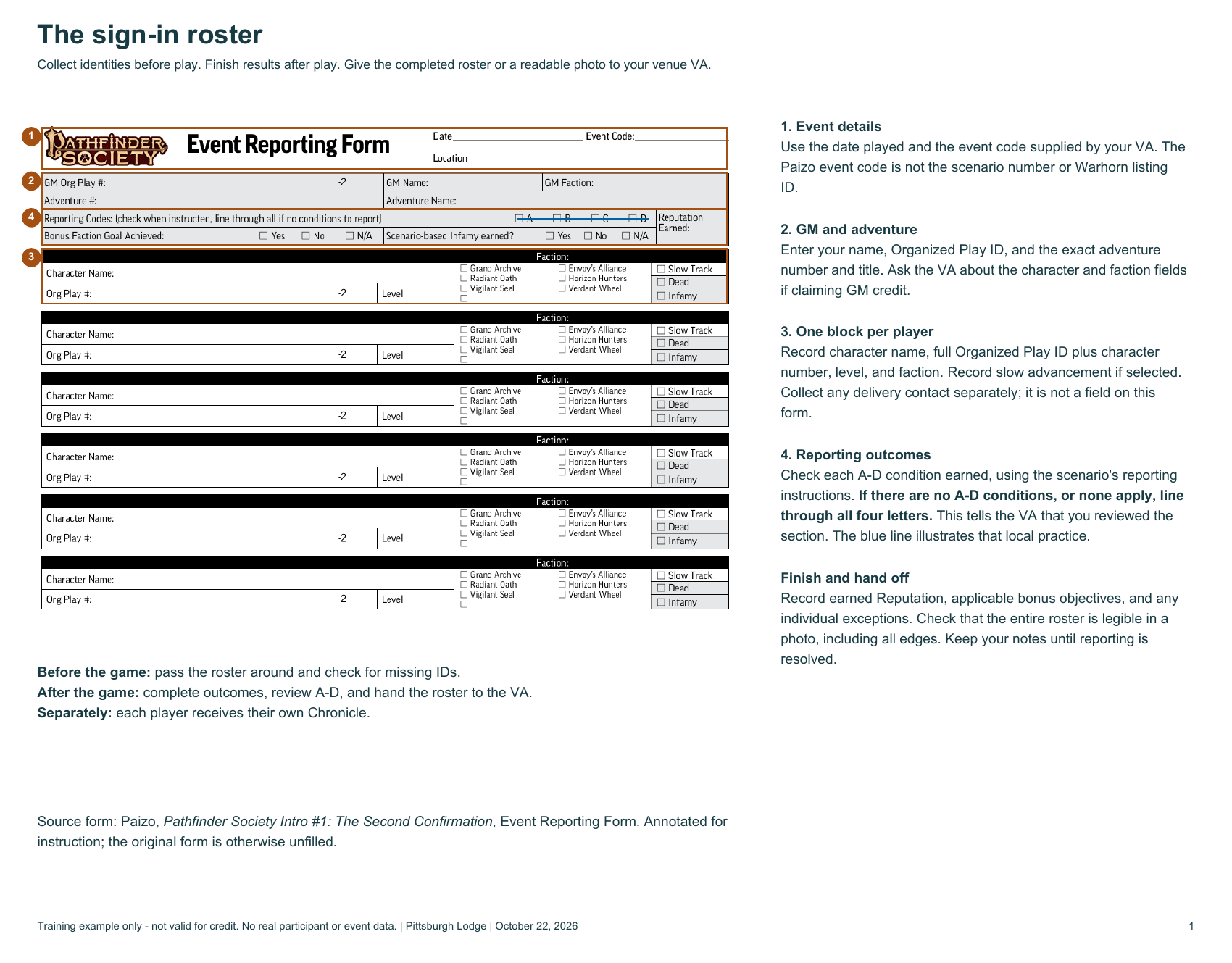
Open the image for a larger view. The field explanations also appear in sections 3, 4, 6, and 8 above.
View the annotated Chronicle (scenario spoilers)
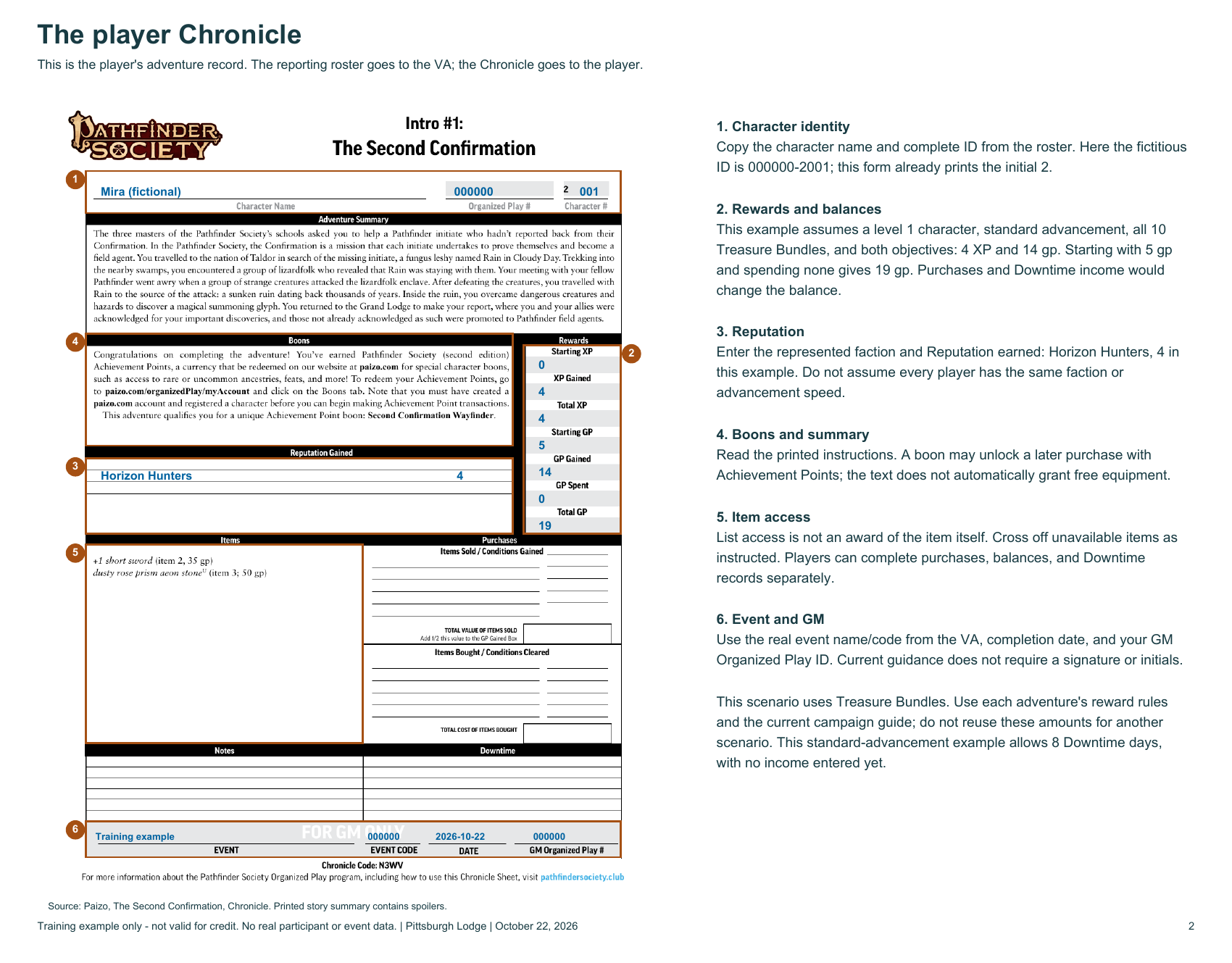
The worked example assumes a level 1 character on standard advancement, all 10 Treasure Bundles, and both objectives: 4 XP, 14 gp, and 4 Reputation with Horizon Hunters. Starting with 5 gp and making no purchases gives a balance of 19 gp. The character also has 8 Downtime days, with no income entered yet. These are this example’s results, not a universal award.
Source forms: Paizo, The Second Confirmation, Event Reporting Form and Chronicle. Annotations by Pittsburgh Lodge.
Game-day checklist
Before play
- Claim the GM seat on Warhorn and contact the VA.
- Get the scenario, read it, and prepare its encounters and materials.
- Confirm event details, welcome the players, and collect roster information.
During play
- Explain the mission, invite participation, and keep an eye on time.
- Award Hero Points and track objectives, rewards, and reporting conditions.
After play
- Finish the story and review outcomes.
- Complete and distribute player Chronicles.
- Check applicable A–D conditions, or cross out all four if none apply.
- Give the VA the completed roster or a readable photo.
- Keep notes and ask for help with unresolved questions.
Ready to volunteer? Find a table on Warhorn, then contact your venue’s VA. You can also ask the Lodge for help on Discord.
Last reviewed October 22, 2026. This guide covers Pathfinder Society Second Edition. Current official campaign guidance takes precedence if rules change.